


B2B website design helps a business buyer understand suitability, assess evidence and begin the right conversation. Organise 4 things clearly: the offer, the buyer’s requirements, credible supporting information and the enquiry route. A visually impressive homepage is incomplete if the visitor cannot determine whether the business can address the actual problem.
Start with the buying situation rather than a preferred animation or template. A technical evaluator, procurement contact and operational user may need different information about the same service. The website should connect those needs without inventing capabilities or overwhelming every visitor with the entire internal process.
Which B2B page pattern fits the offer?
The following are original illustrative structures, not named client projects or measured conversion results. Use them to compare how different buying questions can shape a page.
| Business situation | Useful page structure | Main question to answer |
|---|---|---|
| Technical service | Problem, scope, requirements, evidence and next step | Can this business address the relevant environment? |
| Product or equipment supplier | Category, actual specifications, qualifications and enquiry | Is the offered item suitable for the intended use? |
| Professional service | Defined work, process, supported credentials and contact | What is covered and what information is needed? |
| Custom implementation | Outcomes, constraints, integration questions and discovery route | What needs to be established before a proposal? |
The table is a design brief framework, not a rule that every B2B website needs the same number of pages. A simple offer can be explained concisely. A complex one may need separate pages so that important qualifications remain readable.
Use real content during design. Long product names, ordinary explanations and supported evidence reveal whether a layout works. Do not approve a template solely because its sample headings are short and its stock imagery makes the business appear larger than it is.
How should evidence and trust be presented?
State what the business actually does and preserve material boundaries. A planned capability is not an existing service. A product feature documented elsewhere is not proof that the business supplies or supports it. Have the responsible factual owner verify the wording.
Use project examples only with appropriate evidence and permission. Describe the business’s actual contribution rather than claiming the whole result where several parties were involved. If an example is illustrative, label it so that it cannot be mistaken for a customer case.
Keep credentials precise. Name the status actually held and the relevant scope. Avoid badges or broad claims whose meaning cannot be established. The design should make supported information easy to inspect rather than use decoration to imply an endorsement.
Photographs need the same honesty. A licensed office scene can illustrate a theme, but it should not imply that the pictured premises or people belong to the business. Use relevant material with clear provenance and check the actual crops in the intended layout.
What should the enquiry form ask?
W3C’s forms guidance connects labels, instructions, structure and feedback with accessible form use. Apply those principles to the buyer’s task. Ask for the information needed for the next conversation, not every detail that might eventually be useful.
Explain unfamiliar questions. A technical field can be appropriate when the buyer knows the answer, but it can also create an unnecessary barrier. Offer a clear way to state uncertainty rather than forcing a guessed value that later becomes part of the scope.
Keep sensitive records and credentials out of a casual enquiry. A redacted description of systems or requirements can be enough to begin. Define an appropriate authorised route if more sensitive material is needed later.
Use this original B2B enquiry design card:
| Element | What to decide | Acceptance question |
|---|---|---|
| Entry | Which page or content led to the form? | Is the original subject preserved? |
| Identity | What contact information is necessary? | Can the business respond through the intended route? |
| Requirement | What problem needs discussion? | Can the visitor explain it without specialist jargon? |
| Context | Which optional details improve the conversation? | Is uncertainty allowed honestly? |
| Instructions | What should not be submitted? | Are sensitive-data boundaries understandable? |
| Validation | How an error is explained | Can the person correct it without losing context? |
| Confirmation | What actually happened | Does it avoid an unsupported response promise? |
| Routing | Who receives and owns the request? | Is receipt and handover verifiable? |
The card is an original practical artefact. It specifies what to test; it does not claim that a particular website has already passed or that the form guarantees a commercial outcome.
How do you test the design with buyers?
The GOV.UK moderated usability-testing guide describes observing participants attempt tasks. Use a relevant method to test whether people can understand the offer, find a qualification and begin an appropriate enquiry. The source is design guidance, not evidence of a conversion improvement for this site.
Give a neutral task instead of explaining where to click. Observe what the person understands from the page and where they hesitate. Separate the observation from a proposed explanation so that a design preference does not become an unsupported research finding.
Include mobile viewing and realistic information. A buyer may first encounter the page on a phone and later share it with colleagues. Important context should survive a direct link to an internal page, not depend on seeing the homepage first.
What should operational handover include?
Verify that the enquiry reaches the intended recipient with the relevant context. A browser success message is not proof of internal receipt. Identify the person who owns follow-up and the route when that person is absent.
Keep public contact information consistent across the page, form and confirmation. A site can appear complete while directing different users to obsolete addresses. Test the actual destinations and remove sample or inherited details.
Document how service information and evidence are updated. A B2B website should remain accurate as offerings, credentials and project permissions change. The maintainer needs a clear factual owner rather than permission to improvise claims.
See web development for related implementation work. To explain a B2B website requirement, get started with the buying audience, verified offer and information customers need before a useful discussion.
Two inspectable original page studies
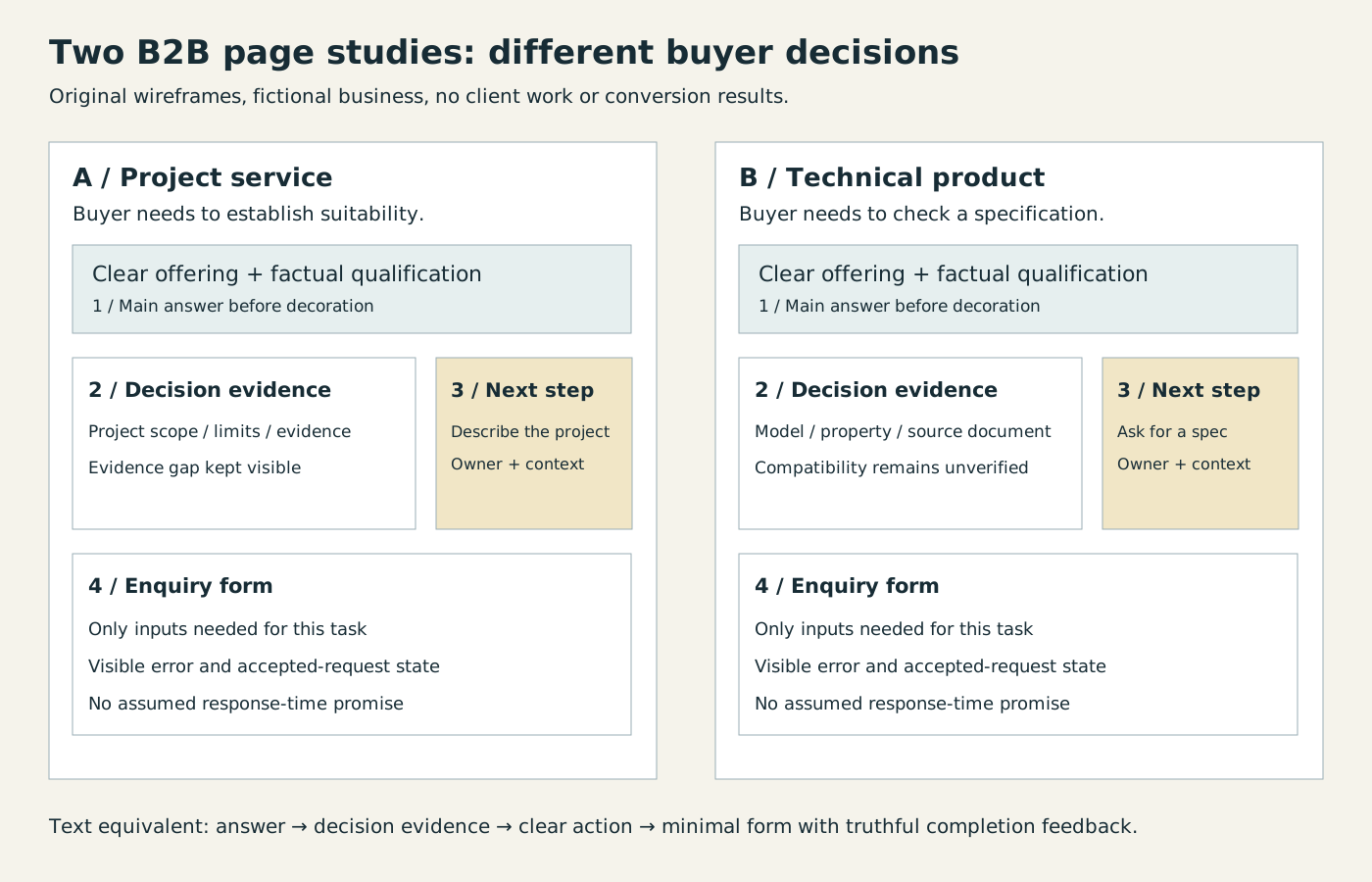
The accompanying illustrative sheet compares a project-service page with a technical-product page. Both put the main answer before decoration, but the evidence differs. The service concept needs scope, constraints and a clear account of the contribution. The product concept needs a model reference, the actual property being discussed and a source document; compatibility stays unresolved until verified.
Use the numbered reading order to inspect each study: main answer, decision evidence, next action and enquiry form. The service action asks the visitor to describe a project; the product action asks for a specification. Neither promises a response time or invents a client result. The text equivalent is: explain the offer, show its relevant evidence, provide the next action, then request only information needed to continue.
The SVG is original illustrative artwork with an actual rendered PNG retained for inspection. It is a supporting wireframe, not a finished client website, photographic hero or measured conversion study. Evaluate it with the neutral buyer tasks below, replacing placeholders only with verified content.
How can the two page studies be tested without inventing a result?
Use two proposed tasks with the existing original studies. For the project-service page, ask a participant to decide whether the stated scope addresses a described problem and identify what information to send next. For the technical-product page, ask which reference document would be needed before accepting a compatibility claim. Do not tell the participant which numbered panel contains the answer.
The GOV.UK research guide supports planning relevant, believable tasks and observing their completion; it does not report results for these fictional pages. Record what was observed separately from the designer’s explanation. Apply the W3C form guidance to labels, necessary inputs, grouped controls, corrective feedback and confirmation. The studies and these tasks are proposed design material, not completed user research or conversion evidence. Their rendered evidence file accompanies this article’s supporting-asset metadata.
By Spout Team. AI-assisted drafting by Codex using the linked primary sources.